在Linux文件系统上查找符合条件的文件;可用工具locate、find命令查找;
1、locate:
1.1 工作机制
依赖于系统事先构建好的索引库来实现;系统可通过周期性任务实现索引库的更新;也可通过手动更新索引库(使用命令:updatedb),但手动更新会消耗系统资源;
1.2 工作特性:
查找速度快;
模糊查找;
非实时查找;
1.3 locate命令安装:
yum -y install mlocate
locate命令:locate – find files by name
locate [OPTION] … PATTERN …
OPTIONS:
-b : 只匹配路径中的基名;依然是模糊查找方式;
-c : 统计出共有多少符合条件的文件;
-r : BRE,基于正则表达式来编写模式;
[root@localhost tmp]#
[root@localhost tmp]# locate -c passwd
142
[root@localhost tmp]#
[root@localhost tmp]# locate -c -b  passwd
138
[root@localhost tmp]#
====================================
2、find:
2.1 工作机制:实时查找工具,通过遍历指定的起始路径下文件系统层级结构,完成文件查找;
2.2 工作特性:
实时查找;
精确查找;
查找速度略慢;
find : find – search for files in a directory hierarchy
find [-H] [-L] [-P] [-D debugopts] [-Olevel] [path…] [expression]
find [OPTIONS] [查找起始路径] [查找条件] [处理动作]
2.3 说明:
查找起始路径:指定具体搜索目标的起始路径;默认为当前目录;
查找条件:指定的查找标准,可根据文件名、文件大小、文件类型、从属关系、权限等标准进行;默认为找出指定路径下的所有文件(find 不带任何选项、参数);
处理动作:对符合查找条件的文件做出的动作,如删除、另存为等;默认动作为输出至标准输出;
2.4 查找条件:
expression (表达式):由选项和测试条件组成;
测试条件:结果通常为布尔型(要么是true,要么是false);
1> 根据文件名查找:
-name “pattern” : 精确匹配文件的基名;
-iname “pattern” : 不区分字母大小写来匹配基名;
备注,”pattern”支持glob风格的通配符:* , ? , [] , [^] ;
-regex “pattern” : 基于正则表达式模式查找文件,匹配的范围是整个路径,而非其基名;####
2> 根据文件从属关系查找:
-user USERNAME : 查找某属主的所有文件(包括目录);
-group GROUPNAME : 查找某属组的所有文件(包括目录);
-nouser : 查找没有属主的文件;
-nogroup : 查找没有属组的文件;
-uid UID : 查找指定UID的所有文件;
-gid GID : 查找指定GID的所有文件;
3> 根据文件类型查找:
-type TYPE :
文件type类型由如下:
f : 普通文件;
d : 目录文件;
l : 符号链接文件;
b : 块设备文件;
c : 字符设备文件;
p : 管道文件;
s : 套接字文件;
4> 组合测试:
-a : 与运算,find命令的默认组合逻辑;2个条件必须同时成立;
-o : 或运算,只要符合一个条件即可,符合前面的条件或者符合后面的条件;
-not , ! : 非运算;
~]# find /tmp ! -user root -ls
~]# find /tmp ! -name fstab -ls
举例:
[root@localhost ab]#
[root@localhost ab]# ll
total 0
-rw-r--r-- 1 root  root 0 Mar 26 16:44 2fstab
-rw-r--r-- 1 user1 root 0 Mar 26 16:42 afstab
-rw-r--r-- 1 user2 root 0 Mar 26 16:42 bfstab
-rw-r--r-- 1 user2 root 0 Mar 26 16:42 dfstabss
-rw-r--r-- 1 user3 root 0 Mar 26 16:42 eefstabkk
-rw-r--r-- 1 user1 root 0 Mar 26 16:42 fstab
-rw-r--r-- 1 user3 root 0 Mar 26 16:42 mfstabc
[root@localhost ab]#
[root@localhost ab]#
[root@localhost ab]# find /ab !  -user user1 -a ! -iname "fstab"  -ls
101108297    0 drwxr-xr-x   2 root     root          109 Mar 26 16:44 /ab
101091084    0 -rw-r--r--   1 user2    root            0 Mar 26 16:42 /ab/bfstab
101097216    0 -rw-r--r--   1 user2    root            0 Mar 26 16:42 /ab/dfstabss
101097217    0 -rw-r--r--   1 user3    root            0 Mar 26 16:42 /ab/eefstabkk
101097219    0 -rw-r--r--   1 user3    root            0 Mar 26 16:42 /ab/mfstabc
101097220    0 -rw-r--r--   1 root     root            0 Mar 26 16:44 /ab/2fstab
[root@localhost ab]#
[root@localhost ab]# find /ab ! \( -user user1 -a  -iname "fstab" \) -ls
101108297    0 drwxr-xr-x   2 root     root          109 Mar 26 16:44 /ab
100677078    0 -rw-r--r--   1 user1    root            0 Mar 26 16:42 /ab/afstab
101091084    0 -rw-r--r--   1 user2    root            0 Mar 26 16:42 /ab/bfstab
101097216    0 -rw-r--r--   1 user2    root            0 Mar 26 16:42 /ab/dfstabss
101097217    0 -rw-r--r--   1 user3    root            0 Mar 26 16:42 /ab/eefstabkk
101097219    0 -rw-r--r--   1 user3    root            0 Mar 26 16:42 /ab/mfstabc
101097220    0 -rw-r--r--   1 root     root            0 Mar 26 16:44 /ab/2fstab
[root@localhost ab]#
[root@localhost ab]# find /ab ! \( -user user1 -o  -iname "fstab" \) -ls
101108297    0 drwxr-xr-x   2 root     root          109 Mar 26 16:44 /ab
101091084    0 -rw-r--r--   1 user2    root            0 Mar 26 16:42 /ab/bfstab
101097216    0 -rw-r--r--   1 user2    root            0 Mar 26 16:42 /ab/dfstabss
101097217    0 -rw-r--r--   1 user3    root            0 Mar 26 16:42 /ab/eefstabkk
101097219    0 -rw-r--r--   1 user3    root            0 Mar 26 16:42 /ab/mfstabc
101097220    0 -rw-r--r--   1 root     root            0 Mar 26 16:44 /ab/2fstab
[root@localhost ab]#
德·摩根定律:
非(A且B) = (非A) 或(非B)
非(A或B) = (非A) 且(非B)

与(且,and)、或(或,or)运算图:

A -a B : C区域   ------>   ! ( A -a B ) : ABD区域   ===========\
                                                               |
A -o B : ABC区域 ------>   ! ( A -o B ) : D区域  ==========\    |
                                                           |   |
! A : BD区域     ------>   !A -o !B : ABD区域   ============|===/
                                                           |
! B : AD区域     ------>   !A -a !B : D区域     ===========/
与/或运算:
A -a B : A与B,A且B,表示同时是A,也同时是B;取交集;
A -o B : A或B,表示既可以是A,也可以是B;取并集;
5> 根据文件大小查找:
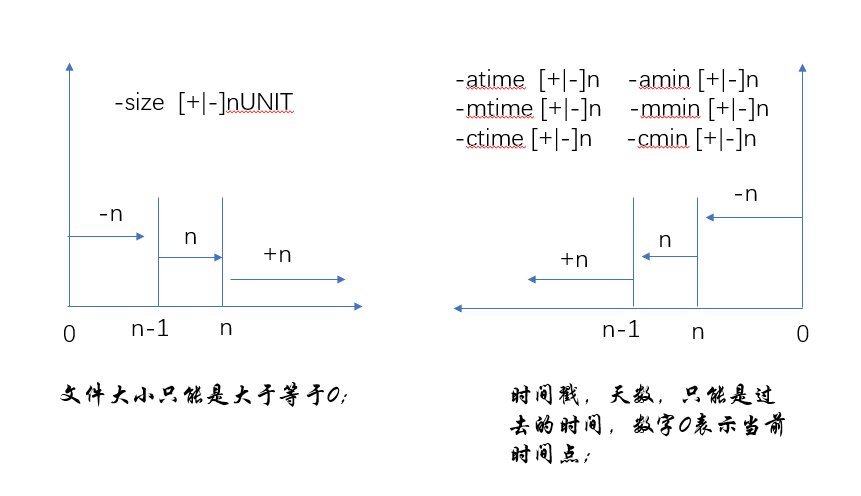
-size [+|-]nUNIT
备注,n表示数字;UNIT表示单位,常用单位有:K,M,G等;
nUNIT : 表示文件大小的范围为 (n-1,n];
-nUNIT : 表示文件大小的范围为 [0,n-1];
+nUNIT : 表示文件大小的范围为 (n,00);数字00表示无穷大;
eg.
find / -size -100M : 表示查找 大于等于0M,小于等于99M的文件;
find / -size 100M : 表示查找 大于99M,小于等于100M的文件;
find / -size +100M : 表示查找 大于100M,小于无穷大的文件;
6> 根据时间戳查找:
以”天”为单位:
-atime -n : n天内访问的文件;取值范围 (n,0];
-atime n : n天前访问的文件;取值范围 (n-1,n];
-atime +n : 至少有n天访问的文件;取值范围 (00,n-1];
eg.
-atime -1 : 大于等于0天,小于1天(24小时)内访问的文件;取值范围,24小时内至当前时间,包括当前时间点;
-atime 1 : 大于等于24小时前,小于48小时内访问的文件;
-atime +1 : 大于等于48小时前访问的文件;
-mtime [+|-]n
-ctime [+|-]n
以”分钟”为单位:
-amin -n
-mmin n
-cmin +n
7> 根据文件权限查找:
类用户:u,g,o ;
权限位:r,w,x ;
-perm mode : 精确匹配;
-perm -mode : 每一类用户的每一个权限位同时符合条件;权限位是”与”关系;
-perm /mode : 任何一类用户的任何一个权限位符合条件即可;权限位是”或”关系;
理解如下举例:
###  /tmp/test 目录下有如下权限的文件;
====================================
[root@localhost test]# ll
total 0
-rw-r--r-- 1 root root 0 May  1 20:41 a
-rw-rw-rw- 1 root root 0 May  1 20:41 b
-r--r----- 1 root root 0 May  1 20:41 c
-rwxrwxrwx 1 root root 0 May  1 20:41 d
-rwxrwxr-x 1 root root 0 May  1 20:41 e
-rw-r--r-- 1 root root 0 May  1 20:41 f
[root@localhost test]#

###  精确匹配文件权限为 '666' 的文件;
---------------------------------
[root@localhost test]# find /tmp/test -perm 666 -ls
34279158    0 -rw-rw-rw-   1 root     root            0 May  1 20:41 /tmp/test/b
[root@localhost test]#

### 查找权限不是 666 的文件 ;
-----------------------------------------------------------------------------------
[root@localhost test]# find /tmp/test -not -perm 666 -ls
67589625    0 drwxr-xr-x   2 root     root           60 May  1 20:45 /tmp/test
33554501    0 -rw-r--r--   1 root     root            0 May  1 20:41 /tmp/test/a
34279163    0 -r--r-----   1 root     root            0 May  1 20:41 /tmp/test/c
34279164    0 -rwxrwxrwx   1 root     root            0 May  1 20:41 /tmp/test/d
34279165    0 -rwxrwxr-x   1 root     root            0 May  1 20:41 /tmp/test/e
34279166    0 -rw-r--r--   1 root     root            0 May  1 20:41 /tmp/test/f
[root@localhost test]#

### 或关系,任何一位(ugo)的权限(rwx)是 'w' 的文件;
--------------------------------------------------
[root@localhost test]# find /tmp/test -perm /222 -ls
67589625    0 drwxr-xr-x   2 root     root           60 May  1 20:45 /tmp/test
33554501    0 -rw-r--r--   1 root     root            0 May  1 20:41 /tmp/test/a
34279158    0 -rw-rw-rw-   1 root     root            0 May  1 20:41 /tmp/test/b
34279164    0 -rwxrwxrwx   1 root     root            0 May  1 20:41 /tmp/test/d
34279165    0 -rwxrwxr-x   1 root     root            0 May  1 20:41 /tmp/test/e
34279166    0 -rw-r--r--   1 root     root            0 May  1 20:41 /tmp/test/f
[root@localhost test]#

### 没有任何一位的权限是 2 的文件;
----------------------------------
[root@localhost test]# find /tmp/test -not -perm /222 -ls
34279163    0 -r--r-----   1 root     root            0 May  1 20:41 /tmp/test/c
[root@localhost test]#
[root@localhost test]#

### 与关系,需同时符合条件;
-----------------------------
[root@localhost test]# find /tmp/test -perm -222 -ls
34279158    0 -rw-rw-rw-   1 root     root            0 May  1 20:41 /tmp/test/b
34279164    0 -rwxrwxrwx   1 root     root            0 May  1 20:41 /tmp/test/d
[root@localhost test]#

### 不是所有的位都不符合权限条件,即:至少有一位不符合条件即可;
---------------------------------------------------------
[root@localhost test]# find /tmp/test -not -perm -222 -ls
67589625    0 drwxr-xr-x   2 root     root           60 May  1 20:45 /tmp/test
33554501    0 -rw-r--r--   1 root     root            0 May  1 20:41 /tmp/test/a
34279163    0 -r--r-----   1 root     root            0 May  1 20:41 /tmp/test/c
34279165    0 -rwxrwxr-x   1 root     root            0 May  1 20:41 /tmp/test/e
34279166    0 -rw-r--r--   1 root     root            0 May  1 20:41 /tmp/test/f
[root@localhost test]#

### 数字0,表示不做匹配;
[root@localhost test]# find /tmp/test -perm /002 -ls
34279158    0 -rw-rw-rw-   1 root     root            0 May  1 20:41 /tmp/test/b
34279164    0 -rwxrwxrwx   1 root     root            0 May  1 20:41 /tmp/test/d
[root@localhost test]#
[root@localhost test]# find /tmp/test -perm /022 -ls
34279158    0 -rw-rw-rw-   1 root     root            0 May  1 20:41 /tmp/test/b
34279164    0 -rwxrwxrwx   1 root     root            0 May  1 20:41 /tmp/test/d
34279165    0 -rwxrwxr-x   1 root     root            0 May  1 20:41 /tmp/test/e
[root@localhost test]#

### '/000' ,表示没有匹配任何条件,查找显示所有文件;'/00' 不在使用,用 '-000'代替;
------------------------------------------------------------------------------
[root@localhost test]# find /tmp/test -perm /000 -ls
find: warning: you have specified a mode pattern /000 (which is equivalent to /000). The meaning of -perm /000 has now been changed to be consistent with -perm -000; that is, while it used to match no files, it now matches all files.
67589625    0 drwxr-xr-x   2 root     root           60 May  1 20:45 /tmp/test
33554501    0 -rw-r--r--   1 root     root            0 May  1 20:41 /tmp/test/a
34279158    0 -rw-rw-rw-   1 root     root            0 May  1 20:41 /tmp/test/b
34279163    0 -r--r-----   1 root     root            0 May  1 20:41 /tmp/test/c
34279164    0 -rwxrwxrwx   1 root     root            0 May  1 20:41 /tmp/test/d
34279165    0 -rwxrwxr-x   1 root     root            0 May  1 20:41 /tmp/test/e
34279166    0 -rw-r--r--   1 root     root            0 May  1 20:41 /tmp/test/f
[root@localhost test]#
[root@localhost test]# find /tmp/test -perm -000 -ls
67589625    0 drwxr-xr-x   2 root     root           60 May  1 20:45 /tmp/test
33554501    0 -rw-r--r--   1 root     root            0 May  1 20:41 /tmp/test/a
34279158    0 -rw-rw-rw-   1 root     root            0 May  1 20:41 /tmp/test/b
34279163    0 -r--r-----   1 root     root            0 May  1 20:41 /tmp/test/c
34279164    0 -rwxrwxrwx   1 root     root            0 May  1 20:41 /tmp/test/d
34279165    0 -rwxrwxr-x   1 root     root            0 May  1 20:41 /tmp/test/e
34279166    0 -rw-r--r--   1 root     root            0 May  1 20:41 /tmp/test/f
[root@localhost test]#
[root@localhost test]# find /tmp/test -perm -022 -ls
34279158    0 -rw-rw-rw-   1 root     root            0 May  1 20:41 /tmp/test/b
34279164    0 -rwxrwxrwx   1 root     root            0 May  1 20:41 /tmp/test/d
[root@localhost test]#

### 再次理解"与"、"或":
===========================================
[root@localhost test]# find /tmp/test  -perm -005 -ls
67589625    0 drwxr-xr-x   2 root     root           60 May  1 20:45 /tmp/test
34279164    0 -rwxrwxrwx   1 root     root            0 May  1 20:41 /tmp/test/d
34279165    0 -rwxrwxr-x   1 root     root            0 May  1 20:41 /tmp/test/e
[root@localhost test]# find /tmp/test  -perm -006 -ls
34279158    0 -rw-rw-rw-   1 root     root            0 May  1 20:41 /tmp/test/b
34279164    0 -rwxrwxrwx   1 root     root            0 May  1 20:41 /tmp/test/d
[root@localhost test]#
[root@localhost test]# find /tmp/test  -perm /006 -ls
67589625    0 drwxr-xr-x   2 root     root           60 May  1 20:45 /tmp/test
33554501    0 -rw-r--r--   1 root     root            0 May  1 20:41 /tmp/test/a
34279158    0 -rw-rw-rw-   1 root     root            0 May  1 20:41 /tmp/test/b
34279164    0 -rwxrwxrwx   1 root     root            0 May  1 20:41 /tmp/test/d
34279165    0 -rwxrwxr-x   1 root     root            0 May  1 20:41 /tmp/test/e
34279166    0 -rw-r--r--   1 root     root            0 May  1 20:41 /tmp/test/f
[root@localhost test]#
8> 处理动作:
-print : 输出至标准输出;默认动作;
-ls : 类似 “ls -l” 命令;
-delete : 删除查找到的文件;
-fls /PATH/TO/SOMEFILE : 把查找到的所有文件的长格式信息保存至指定文件中;
-ok COMMOND {} \; : 对查找到的所有文件执行由COMMOD表示的命令;每次操作都需要用户进行确认;
-exec COMMOD {} \; : 对查找到的所有文件执行由COMMOD表示的命令;不需要用户的确认操作;
举例:
[root@localhost test]# ll
total 0
-rw-r--r-- 1 root root   0 May  1 20:41 a
-rw-rw-rw- 1 1000 centos 0 May  1 20:41 b
-r--r----- 1 root root   0 May  1 20:41 c
-rwxrwxrwx 1 1000 centos 0 May  1 20:41 d
-rwxrwxr-x 1 root root   0 May  1 20:41 e
-rw-r--r-- 1 1000 centos 0 May  1 20:41 f
[root@localhost test]#
[root@localhost test]# id user1
uid=3008(user1) gid=3008(user1) groups=3008(user1)
[root@localhost test]#
[root@localhost test]# find ./ -nouser -ok chown user1.user1 {} \;
< chown ... ./b > ? y
< chown ... ./d > ? y
< chown ... ./f > ? y
[root@localhost test]#


[root@localhost test]# find /tmp/test  -perm -006 -ls
34279158    0 -rw-rw-rw-   1 user1    user1           0 May  1 20:41 /tmp/test/b
34279164    0 -rwxrwxrwx   1 user1    user1           0 May  1 20:41 /tmp/test/d
[root@localhost test]#
[root@localhost test]# find /tmp/test  -perm -006 -exec mv {} {}.backup \;
[root@localhost test]#
[root@localhost test]# ll
total 0
-rw-r--r-- 1 root  root  0 May  1 20:41 a
-rw-rw-rw- 1 user1 user1 0 May  1 20:41 b.backup
-r--r----- 1 root  root  0 May  1 20:41 c
-rwxrwxrwx 1 user1 user1 0 May  1 20:41 d.backup
-rwxrwxr-x 1 root  root  0 May  1 20:41 e
-rw-r--r-- 1 user1 user1 0 May  1 20:41 f
[root@localhost test]#
=======================
理解如下:
## 查找 /var 目录下属主为root,且属组为mail的所有文件或目录;
---------------------------------------------------------
[root@localhost test]# find /var -user root -a -group mail -ls
67157783    0 drwxrwxr-x   2 root     mail          146 May  1 21:58 /var/spool/mail
67589626    4 -rw-------   1 root     mail         1119 May  1 20:16 /var/spool/mail/root
[root@localhost test]#


## 查找 /tmp/test 目录下属主不属于root,bin 或者hadoop的所有文件或目录;
-------------------------------------------------------------------
[root@localhost test]#
[root@localhost test]# pwd
/tmp/test
[root@localhost test]# ll
total 0
-rw-r--r-- 1 hadoop hadoop 0 May  1 20:41 a
-rw-rw-rw- 1 bin    bin    0 May  1 20:41 b.backup
-r--r----- 1 root   root   0 May  1 20:41 c
-rwxrwxrwx 1 bin    bin    0 May  1 20:41 d.backup
-rwxrwxr-x 1 root   root   0 May  1 20:41 e
-rw-r--r-- 1 hadoop hadoop 0 May  1 20:41 f
-rw-r--r-- 1 user3  user3  0 May  1 22:13 g
-rw-r--r-- 1 user3  user3  0 May  1 22:13 h
[root@localhost test]#
[root@localhost test]# find /tmp/test -not -user root -a -not -user bin -a -not -user hadoop -ls
67589627    0 -rw-r--r--   1 user3    user3           0 May  1 22:13 /tmp/test/g
67589628    0 -rw-r--r--   1 user3    user3           0 May  1 22:13 /tmp/test/h
[root@localhost test]#
[root@localhost test]# find /tmp/test -not \( -user root -o -user bin -o -user hadoop \) -ls
67589627    0 -rw-r--r--   1 user3    user3           0 May  1 22:13 /tmp/test/g
67589628    0 -rw-r--r--   1 user3    user3           0 May  1 22:13 /tmp/test/h
[root@localhost test]#


## 查找 /tmp/test 目录下最近一周内其内容修改过,且属主不是root,也不是Hadoop用户的文件;
----------------------------------------------------------------------------------
[root@localhost test]# find /tmp/test -mtime -7 -a -not -user root -a -not -user hadoop -ls
34279158    0 -rw-rw-rw-   1 bin      bin             0 May  1 20:41 /tmp/test/b.backup
34279164    0 -rwxrwxrwx   1 bin      bin             0 May  1 20:41 /tmp/test/d.backup
67589627    0 -rw-r--r--   1 user3    user3           0 May  1 22:13 /tmp/test/g
67589628    0 -rw-r--r--   1 user3    user3           0 May  1 22:13 /tmp/test/h
[root@localhost test]#


## 查找 /tmp/test 目录下,没有属主,或者没有属组,且最近一周内曾被访问过的文件;
--------------------------------------------------------------------------
[root@localhost test]#
[root@localhost test]# ll
total 0
-rw-r--r-- 1  3011  3011 0 May  1 20:41 a
-rw-rw-rw- 1 bin   bin   0 May  1 20:41 b.backup
-r--r----- 1 root  root  0 May  1 20:41 c
-rwxrwxrwx 1 bin   bin   0 May  1 20:41 d.backup
-rwxrwxr-x 1 root  root  0 May  1 20:41 e
-rw-r--r-- 1  3011  3011 0 May  1 20:41 f
-rw-r--r-- 1 user3 user3 0 May  1 22:13 g
-rw-r--r-- 1 user3 user3 0 May  1 22:13 h
[root@localhost test]#
[root@localhost test]# find /tmp/test \( -nouser -o -nogroup \) -a -atime -7 -ls
33554501    0 -rw-r--r--   1 3011     3011            0 May  1 20:41 /tmp/test/a
34279166    0 -rw-r--r--   1 3011     3011            0 May  1 20:41 /tmp/test/f
[root@localhost test]#
[root@localhost test]#


## 查找 /etc 目录下,文件大于1M且类型为普通文件的所有文件;
------------------------------------------------------
[root@localhost test]# find /etc -size +1M -a -type f -ls
33706620 7304 -r--r--r--   1 root     root      7477022 Mar 21 08:13 /etc/udev/hwdb.bin
33862672 1372 -rw-r--r--   1 root     root      1402267 Mar 21 08:13 /etc/selinux/targeted/contexts/files/file_contexts.bin
567535 3644 -rw-r--r--   1 root     root      3730777 Mar 21 08:13 /etc/selinux/targeted/policy/policy.30
100843539 3644 -rw-r--r--   1 root     root      3730777 Mar 21 08:13 /etc/selinux/targeted/active/policy.kern
100843545 3644 -rw-r--r--   1 root     root      3730777 Mar 21 08:13 /etc/selinux/targeted/active/policy.linked
[root@localhost test]#

[root@localhost test]#
[root@localhost test]# find /etc -size +1M -a -type f -exec ls -lh {} \;
-r--r--r-- 1 root root 7.2M Mar 21 08:13 /etc/udev/hwdb.bin
-rw-r--r-- 1 root root 1.4M Mar 21 08:13 /etc/selinux/targeted/contexts/files/file_contexts.bin
-rw-r--r-- 1 root root 3.6M Mar 21 08:13 /etc/selinux/targeted/policy/policy.30
-rw-r--r-- 1 root root 3.6M Mar 21 08:13 /etc/selinux/targeted/active/policy.kern
-rw-r--r-- 1 root root 3.6M Mar 21 08:13 /etc/selinux/targeted/active/policy.linked
[root@localhost test]#


## 查找 /etc 目录下,所有用户都没有写权限的文件(只显示普通文件的话,需加入 '-type f');
---------------------------------------------
[root@localhost test]# find /etc -not -perm /222 -ls
 41817  180 -r--r--r--   1 root     root       183421 Dec 27 05:43 /etc/pki/ca-trust/extracted/java/cacerts
33610070  328 -r--r--r--   1 root     root       334001 Dec 27 05:43 /etc/pki/ca-trust/extracted/openssl/ca-bundle.trust.crt
67243454  248 -r--r--r--   1 root     root       251593 Dec 27 05:43 /etc/pki/ca-trust/extracted/pem/tls-ca-bundle.pem
67243455  200 -r--r--r--   1 root     root       201168 Dec 27 05:43 /etc/pki/ca-trust/extracted/pem/email-ca-bundle.pem
67251776  168 -r--r--r--   1 root     root       171863 Dec 27 05:43 /etc/pki/ca-trust/extracted/pem/objsign-ca-bundle.pem
101034300    4 -r--r--r--   1 root     root          531 May  3  2017 /etc/lvm/profile/cache-mq.profile
101034301    4 -r--r--r--   1 root     root          339 May  3  2017 /etc/lvm/profile/cache-smq.profile
101034302    4 -r--r--r--   1 root     root         3020 Aug  5  2017 /etc/lvm/profile/command_profile_template.profile
101034303    4 -r--r--r--   1 root     root         2309 May  3  2017 /etc/lvm/profile/lvmdbusd.profile
101034336    4 -r--r--r--   1 root     root          828 Aug  5  2017 /etc/lvm/profile/metadata_profile_template.profile
101034337    4 -r--r--r--   1 root     root           76 May  3  2017 /etc/lvm/profile/thin-generic.profile
101034338    4 -r--r--r--   1 root     root           80 May  3  2017 /etc/lvm/profile/thin-performance.profile
100857463    4 -r--------   1 root     root           45 Dec 27 05:43 /etc/openldap/certs/password
33889305    4 ----------   1 root     root          629 May  1 22:28 /etc/gshadow
33889300    4 ----------   1 root     root         1141 May  1 22:28 /etc/shadow
33706596    4 ----------   1 root     root         1170 May  1 22:11 /etc/shadow-
33706620 7304 -r--r--r--   1 root     root      7477022 Mar 21 08:13 /etc/udev/hwdb.bin
101028689    4 -r--r--r--   1 root     root           63 Aug 23  2017 /etc/ld.so.conf.d/kernel-3.10.0-693.el7.x86_64.conf
100843541    4 -r--r--r--   1 root     root           63 Mar  8 03:18 /etc/ld.so.conf.d/kernel-3.10.0-693.21.1.el7.x86_64.conf
33723156    4 -r--r--r--   1 root     root           33 Dec 27 05:43 /etc/machine-id
33636865    4 ----------   1 root     root          640 May  1 22:11 /etc/gshadow-
33873935    4 -r--r-----   1 root     root         3938 Sep  6  2017 /etc/sudoers
[root@localhost test]#


## 查找 /etc 目录下,至少有一类用户没有执行权限的文件(只显示普通文件的话,需加入 '-type f');
--------------------------------------------------
[root@localhost test]#
[root@localhost test]# find /etc -not -perm -111 -ls
......
615754    0 drwxr-x---   2 root     root           45 Dec 27 05:44 /etc/audisp/plugins.d
615755    4 -rw-r-----   1 root     root          358 Aug  5  2017 /etc/audisp/plugins.d/af_unix.conf
615756    4 -rw-r-----   1 root     root          517 Aug  5  2017 /etc/audisp/plugins.d/syslog.conf
33847680    0 drwxr-x---   3 root     root           83 Dec 27 05:49 /etc/audit
33847681    4 -rw-r-----   1 root     root          127 Aug  5  2017 /etc/audit/audit-stop.rules
33847682    4 -rw-r-----   1 root     root          784 Aug  5  2017 /etc/audit/auditd.conf
67367008    0 drwxr-x---   2 root     root           25 Dec 27 05:44 /etc/audit/rules.d
67367014    4 -rw-------   1 root     root          163 Dec 27 05:44 /etc/audit/rules.d/audit.rules
33927517    4 -rw-r-----   1 root     root           81 Dec 27 05:49 /etc/audit/audit.rules
101034357   24 -rw-r--r--   1 root     root        20876 Jun 10  2014 /etc/postfix/access
......


## 查找 /etc/init.d 目录下,所有用户都有执行权限,且其他用户有写权限的所有文件(只显示普通文件的话,需加入 '-type f');
--------------------------------------------------------------------------
[root@localhost test]#
[root@localhost test]# find /etc/init.d -perm -111 -a -perm -002 -ls
33592067    0 lrwxrwxrwx   1 root     root           11 Dec 27 05:43 /etc/init.d -> rc.d/init.d
[root@localhost test]#